

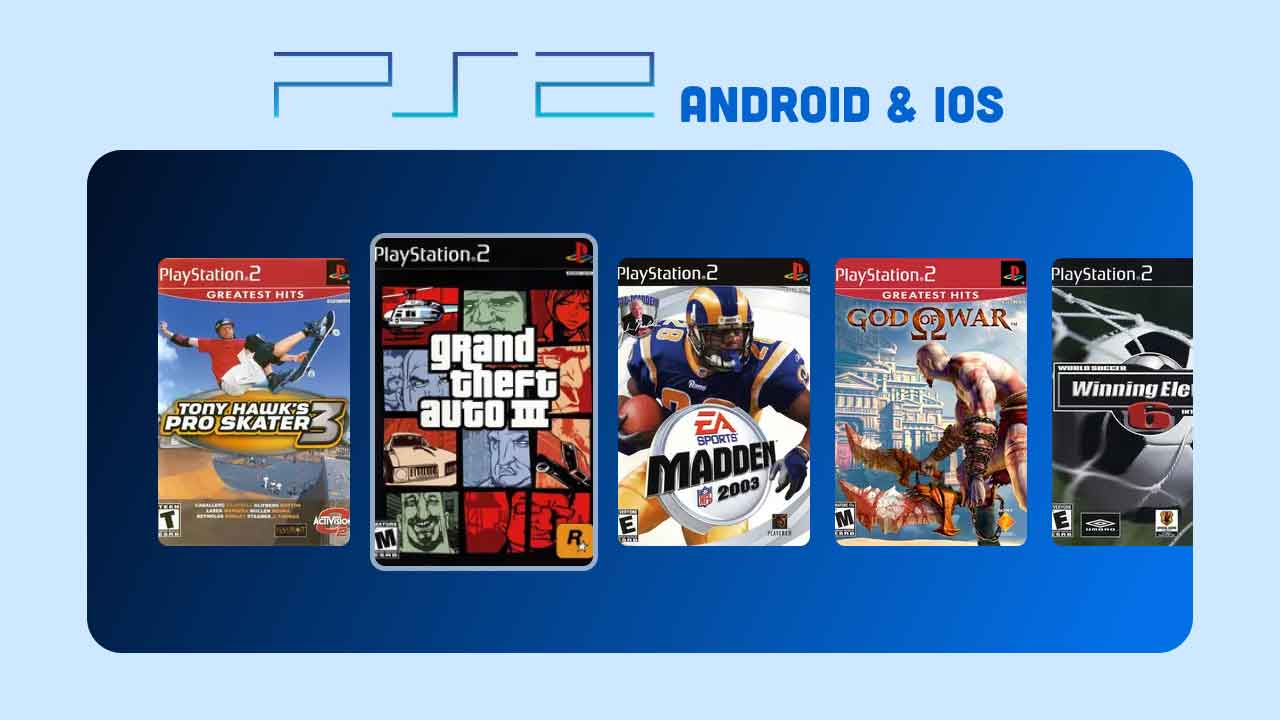
You can play PlayStation 2 games like God of War, Shadow of the Colossus and GTA: San Andreas on a modern phone, and the easiest way to do it in 2026 is ARMSX2. It is a free, open-source PS2 emulator built from PCSX2 (the most accurate PS2 emulator on PC) and rewritten to run fast on ARM chips. It is on Google Play for Android, and it can be sideloaded on iPhone and iPad.
This guide shows you how to install ARMSX2, set it up with your BIOS and games, and pick settings that run smoothly. It also covers other PS2 emulators you can download if ARMSX2 doesn’t suit your device.
- Android: install ARMSX2 from Google Play.
- iPhone/iPad: sideload the ARMSX2
.ipainto LiveContainer and turn on JIT with StikDebug (iOS 18+). - Point ARMSX2 to a PS2 BIOS dumped from your own console.
- Point it to the folder with your game backups (ISO or CHD).
- Leave the renderer on Auto, start at native resolution, and play.
What you need
- A 64-bit phone or tablet. Android 8.0 or newer, or iOS/iPadOS 18 or newer on an iPhone XR / SE (2020) or later. For the smoothest play, use a recent flagship-class chip with a Vulkan GPU and 6 GB+ RAM.
- A PS2 BIOS. ARMSX2 does not include one. The official docs explain how to dump the BIOS from your own PS2 using biosdrain.
- Your games. ISO, CHD, BIN, IMG, MDF or GZ files made from discs you own. CHD files are compressed and save a lot of space.
- A controller (optional). Touch controls work, but a Bluetooth gamepad makes most PS2 games much better.
Emulators are legal. Downloading BIOS files or game ISOs you don’t own is not. Dump them from your own console and discs. Only download ARMSX2 from the official sources linked in this post (armsx2.net, its GitHub or Google Play). Look-alike sites such as armsx2.org are not run by the developers.
How to play PS2 games on Android
Step 1: Install ARMSX2
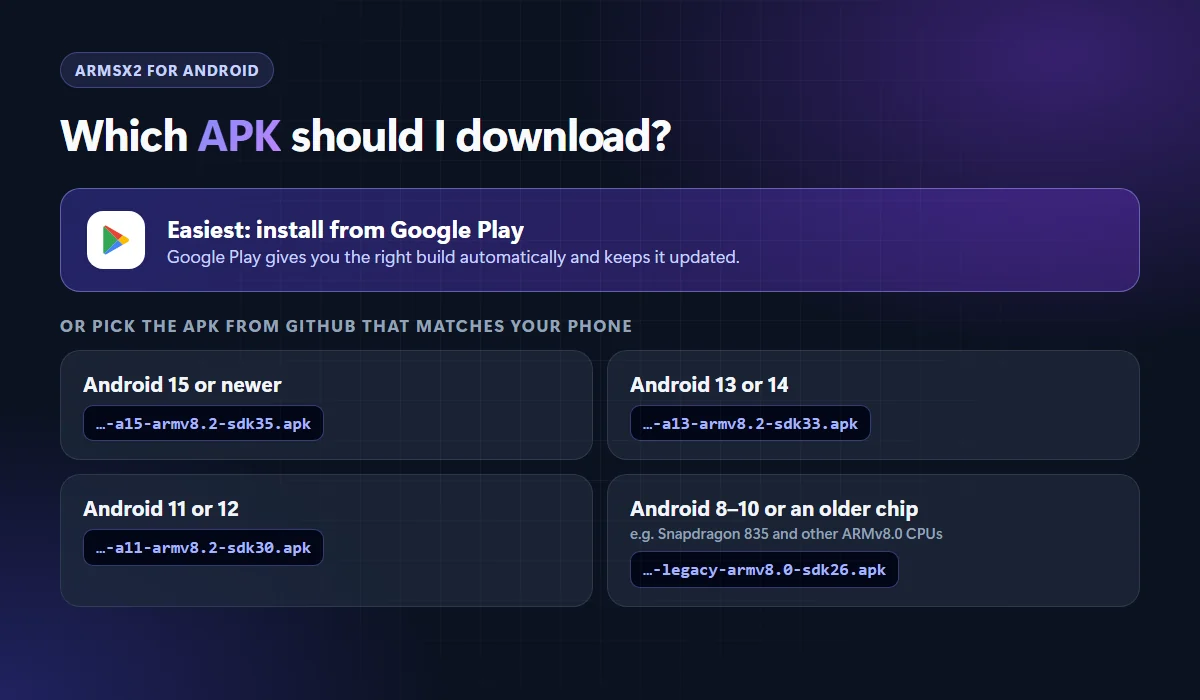
The easiest route is Google Play. It picks the correct build for your phone and updates automatically. The listing has 500K+ downloads and a 4.3★ rating. If you prefer an APK, grab the one that matches your Android version from the ARMSX2 GitHub releases page:
Step 2: Run the first-time setup
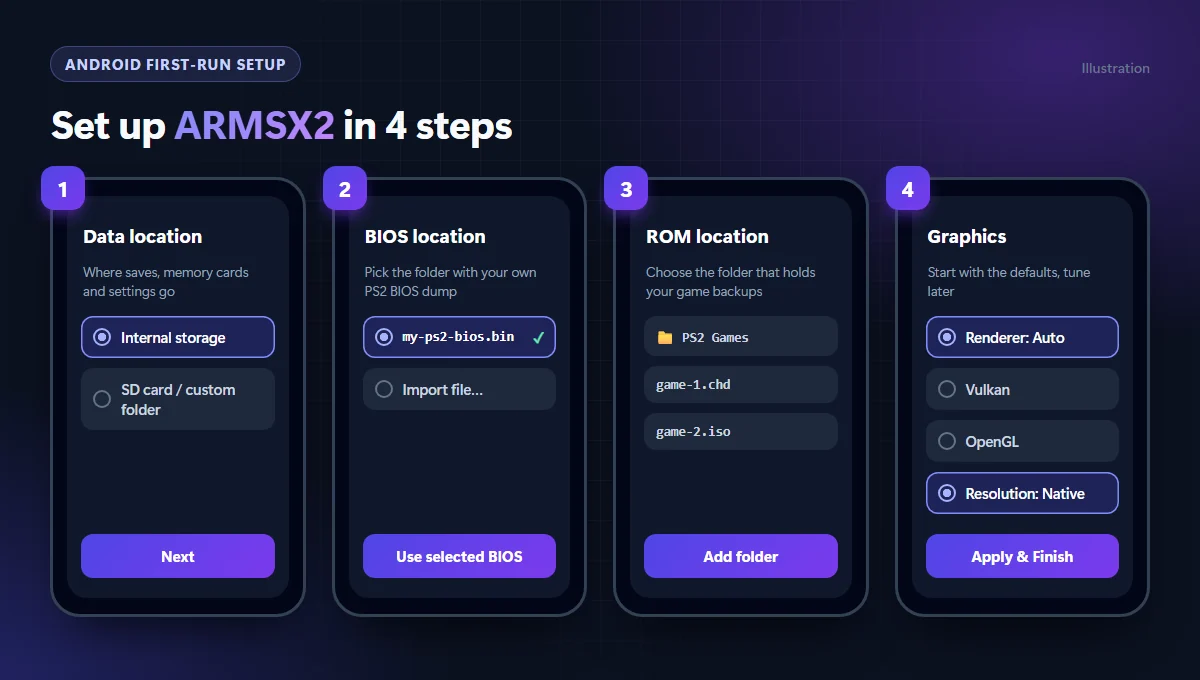
- Choose a data location. Internal storage is fine. Pick an SD card if you’re short on space. Saves, memory cards and settings go here.
- Select your BIOS. Tap the folder that contains your BIOS file. ARMSX2 checks it and lists valid files. Pick one and tap Use Selected BIOS. Don’t leave the BIOS inside a ZIP file.
- Add your games folder. Choose the folder with your ISO/CHD files and allow access. Use a local folder, not a cloud-only one.
- Graphics. Leave the renderer on Auto (Vulkan with OpenGL as the fallback) and keep native resolution for now.
- Tap Apply & Finish, then launch a game you know works well to test the setup.
How to play PS2 games on iPhone and iPad
ARMSX2 isn’t on the App Store. On iPhone it needs JIT (just-in-time compilation) to reach playable speeds, and iOS only allows JIT for sideloaded apps launched with a debugger. The official method uses free tools and a one-time setup on a PC or Mac.
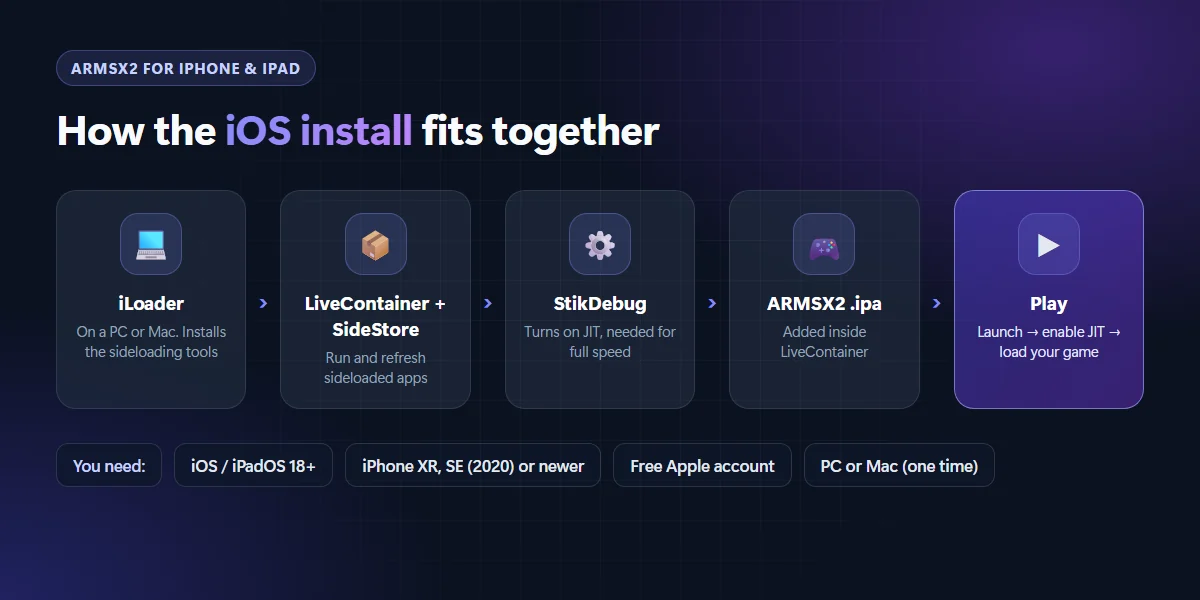
Before you start: remove AltStore if you have it, turn on Developer Mode, and install LocalDevVPN. Download the ARMSX2 .ipa from the releases page and the universal.js script to your iPhone.
- Install the tools. On your computer, run iLoader and choose Install LiveContainer + SideStore (Nightly). Then open Manage Pairing File, choose Place on all apps, and import the certificates into SideStore.
- Get StikDebug. Sign in to SideStore and install StikDebug from it.
- Link LiveContainer to JIT. In LiveContainer, import the certificates from SideStore and set the JIT Enabler to StikDebug.
- Add ARMSX2. Tap + in LiveContainer and pick the ARMSX2
.ipa. Long-press the app, turn on Launch with JIT and selectuniversal.js. - Assign the script. In StikDebug, long-press LiveContainer → Assign Script →
universal.js. - Play. Launch ARMSX2 from LiveContainer, choose Enable and Run Script, then do the same BIOS and games setup as on Android.
If JIT stops working, toggle LocalDevVPN and Wi-Fi off and on again. The full guide with screenshots is in the official ARMSX2 iOS docs. For help with sideloading, see the SideStore docs.
Best ARMSX2 settings for smooth gameplay
- Renderer: keep Auto. If a game glitches, try Vulkan, then OpenGL.
- Resolution: start at native. Raise it to 2x only after the game holds full speed.
- RAISR upscaling: new in 2.8.2 (All Settings → Renderer, or the in-game quick menu). It makes games look sharper for less cost than a higher internal resolution.
- Per-game settings: tune hard games one by one instead of changing global settings. Check the compatibility list to see how a game is reported to run.
- Keep the phone cool. PS2 emulation is heavy, so throttling causes most slowdowns. Take off thick cases, and use a cooler for long sessions.
- Snapdragon (Adreno) phones: custom GPU drivers can fix some graphics bugs, but they’re optional. Try the defaults first.
Download PS2 emulators for Android & iOS
ARMSX2 is our pick for most people, but these are the other PS2 emulators worth knowing about. All links go to official sources.
ARMSX2
Android · iOS · Free & open source
Best overall. It’s based on the latest PCSX2 core, gets regular updates, and supports RetroAchievements, save states and controllers.
NetherSX2
Android · Free
A patched continuation of AetherSX2. It runs well on older and mid-range phones, and v2.2n added experimental online multiplayer. Available as an APK only.
Play!
Android · iOS · Free & open source
A long-running PS2 emulator that doesn’t need a BIOS. It’s slower and less compatible than ARMSX2, but worth a try on devices other emulators don’t support.
What about AetherSX2? It was discontinued and removed from Google Play. Any “AetherSX2” you find in an app store today is an unofficial copy, so use ARMSX2 or NetherSX2 instead.
FAQ
Is ARMSX2 free?
Yes. ARMSX2 is free and open source, with no ads or paid version. The official sources are armsx2.net, its GitHub page and its Google Play listing.
Do I need a BIOS to play PS2 games on ARMSX2?
Yes. ARMSX2 needs a PS2 BIOS file and doesn’t include one. The legal way to get it is to dump it from your own PlayStation 2. The official ARMSX2 docs explain how to do this with biosdrain.
Can I play PS2 games on iPhone without a computer?
Not for the first setup. You need a PC or Mac once, to run iLoader and install LiveContainer, SideStore and the pairing file. After that, you can add games and play from the iPhone alone.
Why are my PS2 games slow or stuttering?
Start at native resolution with the renderer on Auto. Make sure your phone isn’t overheating. On iPhone, check that ARMSX2 was launched with JIT enabled, because without JIT it runs far too slowly to play. Some games just need a faster chip. The compatibility list shows how each game runs.
That’s it. Install ARMSX2, add your BIOS and games, and start with the default settings. Most popular PS2 games run at full speed on a recent phone. If you get stuck, the official ARMSX2 site has detailed docs and a link to its Discord community.




Join the conversation